★ Your magazine. Your say. Complete our reader survey with a chance to win Jack Pyke kit worth £500! ★


Pulsar Symbion LRF DXR50 multispectral binoculars review
These multispectral binoculars are not cheap by any means, but the thermal channel and the handling win the day, says Jules Whicker, who rates them the best he has used


Photographs: Jules Whicker
Multispectral binoculars are now an established presence in the field. They combine a thermal channel with day and night digital channels, allowing the user to switch easily between channels or to view two at once using a picture-in-picture (PiP) window.
Users of thermal monoculars switching to multispectral binoculars will greatly appreciate the ability to confirm the identity of heat sources first observed in the thermal channel without having to reach for a separate set of daylight binoculars or a digital night-vision device.
As well as the welcome reduction in overall weight and clutter around your neck or in your pockets, the instant channel-switching enabled by a multispectral device ensures that the quarry is tracked seamlessly and the potentially disorientating thermal image is consistently situated within a recognisable landscape.
And since almost all multispectral binoculars also incorporate a laser rangefinder, accurate range establishment is always at your fingertips rather than in your pocket. A further advantage is having a single battery, and battery type, rather than several to keep charged and handy.
| Specification | Detail |
|---|---|
| Manufacturer | Pulsar |
| Model | Symbion LRF DXR50 multispectral binoculars |
| Price (RRP) | £3,779.95 |
| Thermal channel | 50mm thermal imager |
| Digital channel | 4K digital camera, with 850nm LED IR illuminator |
| Laser rangefinder | 1,500m maximum range |
| Display | 1920×1080 AMOLED, individually focusable eyepieces |
| Battery | APS5, two supplied with a twin charging dock; USB-C in situ charging |
| App | Pulsar Stream Vision Ballistics |
| Contact | pulsar-vision.co.uk |
The price is the RRP at the time of publication and may have changed since.
How the Symbion performs against the competition
As with any product type in this dynamic market, there’s ample choice, most of it from China, a point of origin that tends to deliver appealing price points with performance to match. One that is not made in China is the subject of this review: Pulsar’s Symbion LRF DXR50. Pulsar knows that it can’t beat the big Chinese electro-optical conglomerates on price, so instead it goes for quality and entirely transforms the user experience in the process.
To be fair, I don’t think Pulsar outdoes its competitors on digital day or night performance. Indeed, it’s not a fight it could reasonably be expected to win. Instead, Pulsar plays to its strengths: deep expertise in thermal imaging and a genius for ergonomic design. In practice, Pulsar’s thermal channel tells you so much that the digital channels deservedly play a supporting role. And Pulsar’s user interfaces, both the digital and the physical, are as efficient as they are pleasurable to use.
The controls, the buttons and the selector ring
The Symbion’s barrels house a 50mm thermal imager on one side and a 4K digital camera on the other, each protected by a hinged, non-rotating quick-detach (QD) cover that folds flat under the barrels. Sitting flush in the bridge between them are the 1,500m laser rangefinder and the 850nm LED IR illuminator that supports the digital NV channel. Moving back, we come first to a blue slider that focuses the IR beam from flood to spot and then to an array of rubberised buttons.
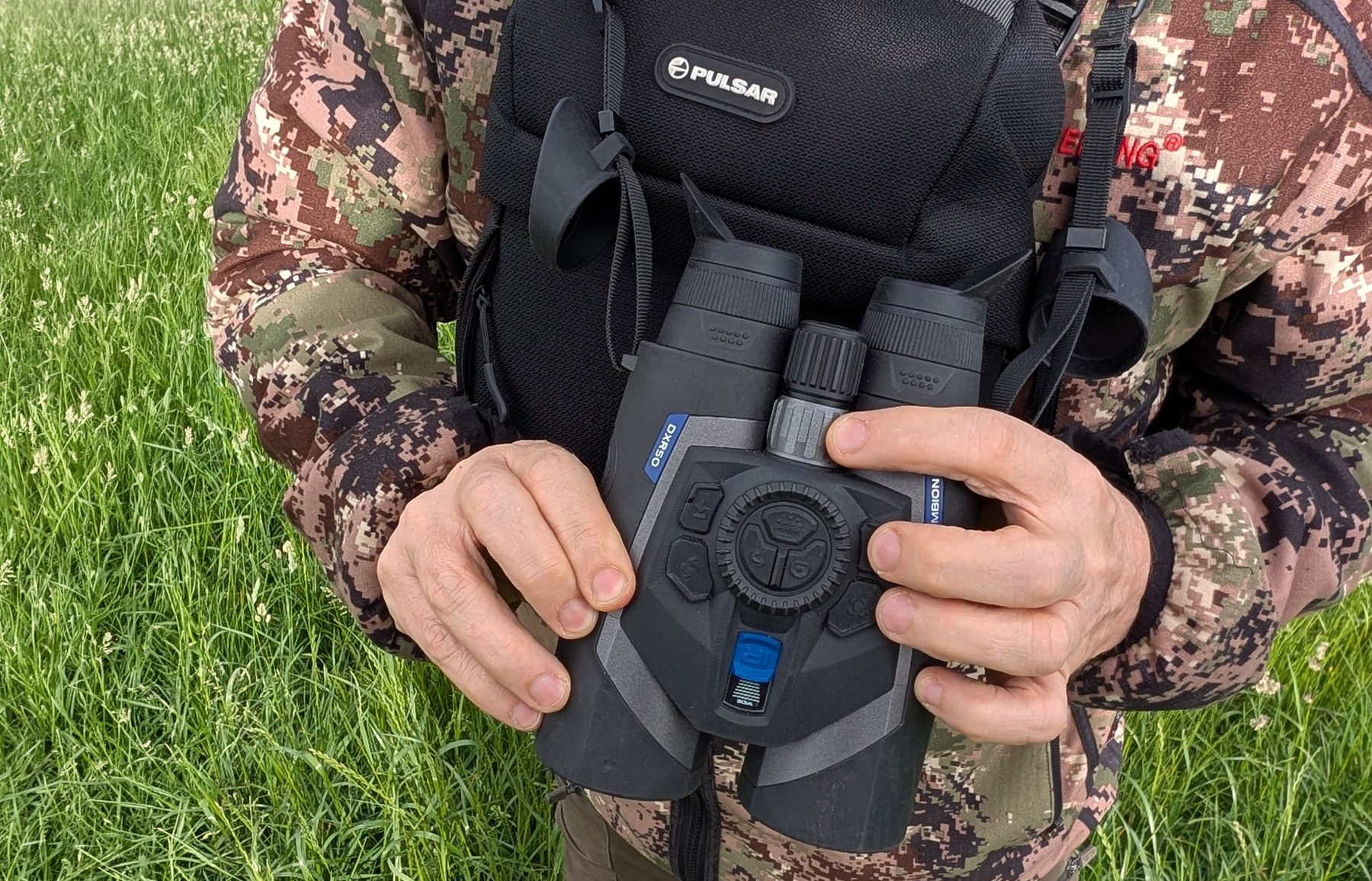

These comprise two groups. First, inside a ridged ring that acts as a selector and zoom dial are three buttons for imaging, menu-activation and menu-level control. The encircling ring differentiates them in a positively tactile way from what, for me, are the primary controls: two pairs of buttons situated to the left and right.
One pair switches channels and performs rangefinding, while the other switches palettes and calibrates the thermal sensor. They fall directly under your fingers and can be switched in the menu to put either pair of functions on your preferred side. The menu also allows you to edit the palette selection, making for speedier transitions by enabling only those you want to use.
Focusing, eyepieces and the tandem dial
The rear of the unit is where everything is brought into focus. Each of the eyepieces, which can be moved together or apart to match your natural eye spacing (interpupillary distance), is individually focusable to give a crisp view of the 1920×1080 AMOLED screen. Between them, a tandem focus dial takes care of the thermal and digital images displayed: the former by the smaller dial nearest your face and the latter by the larger one nearest the bridge.
Focusing has never been easier or more precise, and because the controls are right under your fingertips, you don’t need to reposition your hands. Because its action is silky smooth, there’s no twisting to upset your view. It may seem like a small thing, but it epitomises the enhanced user experience Pulsar delivers.
A similar effect comes from the Symbion’s first and last essential control: its power switch. Situated beneath the focusing dials, it operates like a slick three-position safety catch on a top-end rifle, rotating left for off, right for on and centre for standby.
Alternatively you can leave the unit permanently on and allow the near-eye sensor to activate and deactivate the screen as needed. This process is quick, but I found that training myself to flick the switch off standby as I reached for the binoculars gave me instant observation the moment they reached my eyes. I don’t know why I love this control as much as I do, but it’s probably because it is so positive and tactile that there is never a moment of doubt about its status or operation.
Again, these are tiny things, but their ability to add pleasure and confidence to the experience of using the Symbion is out of all proportion to their size.
Now let’s consider some more ergonomic treats, by way of the Symbion’s armour, battery, case and carrying solutions. Okay, I know everything is armoured these days, but whatever Pulsar is wrapping the Symbion in feels tougher, grippier and better integrated than anything I’ve previously tested – in short, a total tactile pleasure.
Battery, armour and carrying solutions
As for the battery, it may seem fiddly at first, as the APS5 cell needs to be fitted with a twist-on cap before it can be installed in the Symbion, but once there it locks confidently into place and sits perfectly flush with the curve of the barrel. Pulsar supplies two APS5s with the unit, as well as a twin charging dock. You can also top them up in situ using the USB-C socket that is discreetly hidden under a rubber cover alongside the left-hand strap loop.
Which brings me to the comprehensive set of carrying solutions Pulsar has lavished on the Symbion. First, there’s a classic broad neoprene neck strap, with QD clips for easy removal. Then there’s a tough, thickly padded case, with small side accessory pouches, and a silent roll-forward top.
There are also Fastex clips at the rear corners of the case that let you attach a deluxe harness with a comfortably broad yoke that converts it into a bino caddy. And there’s a lightweight binocular harness that connects directly to the Symbion.
So there’s a carrying solution for every scenario and preference, and they are not afterthoughts: all the materials and stitching are first-class. My only gripe, and I guess it’s time I punctuated this rhapsody with at least one, is that Pulsar has stuck to black instead of opting for green, bronze or flat dark earth, a choice that speaks of a night-orientated perspective that the Symbion thoroughly transcends.
The digital interface and the ballistics app

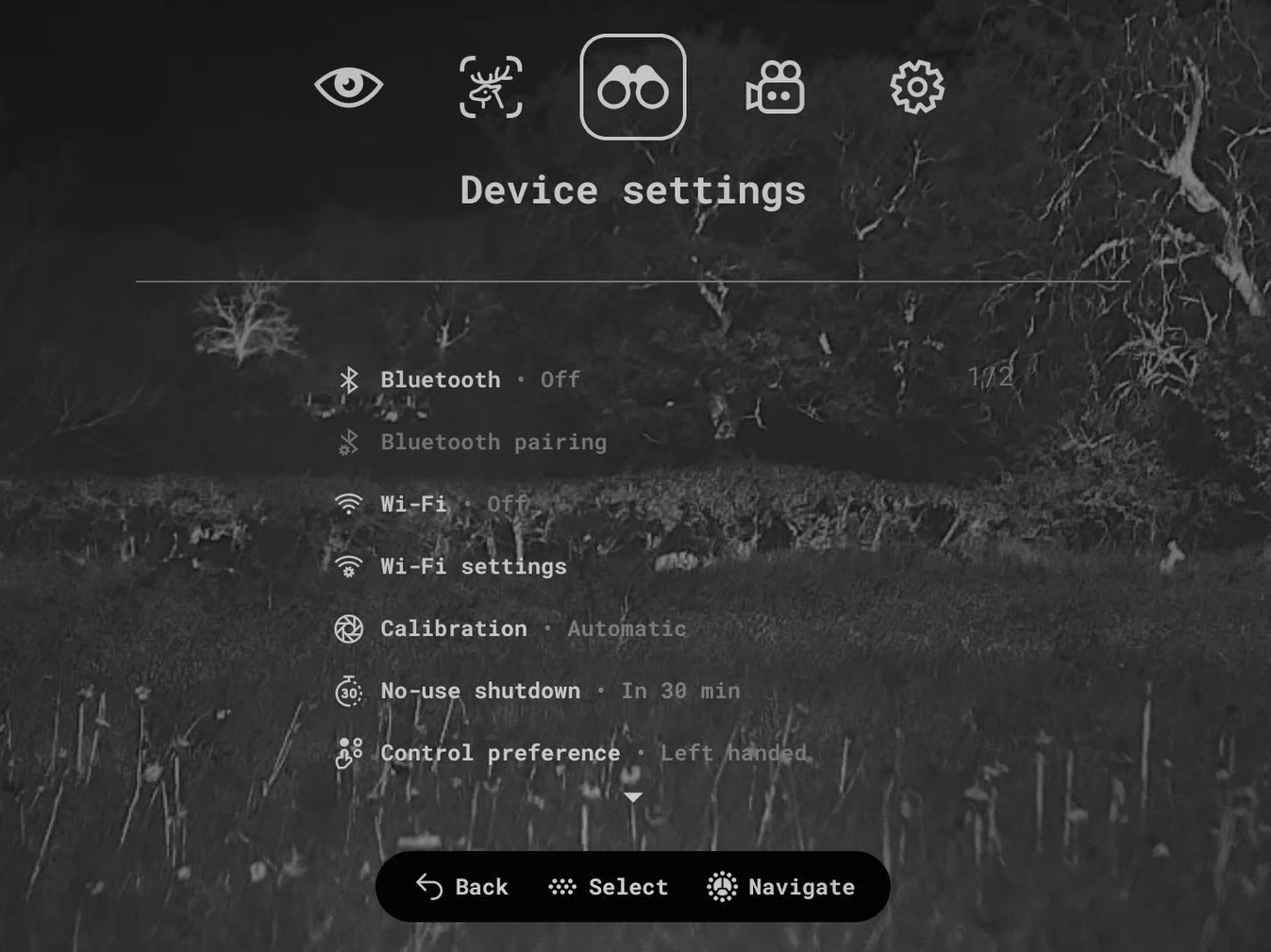
Now for the digital user interface. Again, I totally love this. Icons and text are self-explanatory, clear and somehow still stylish. Menus are ample but uncluttered. Navigation is quick and free of tedious scrolling. The system is easy to pair with Pulsar’s Stream Vision Ballistics app for remote viewing and control, managing stills and videos, and even uploading custom profiles from the app so you can access the holdover numbers for the rifle in use each time you rangefind your quarry. One caveat: when setting up Bluetooth pairing, do yourself a favour and read the manual first.
Thermal, day digital and night digital in the field
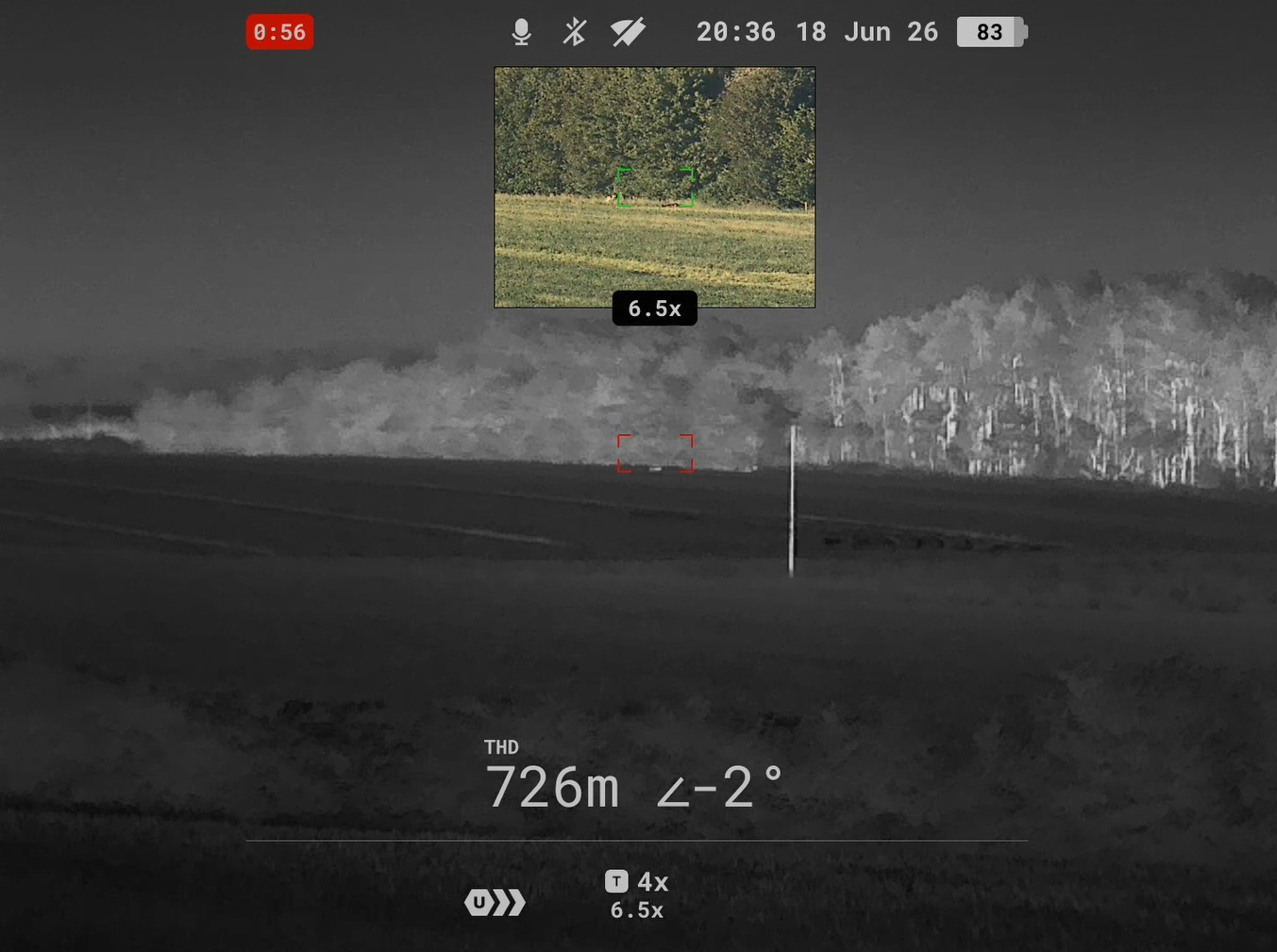
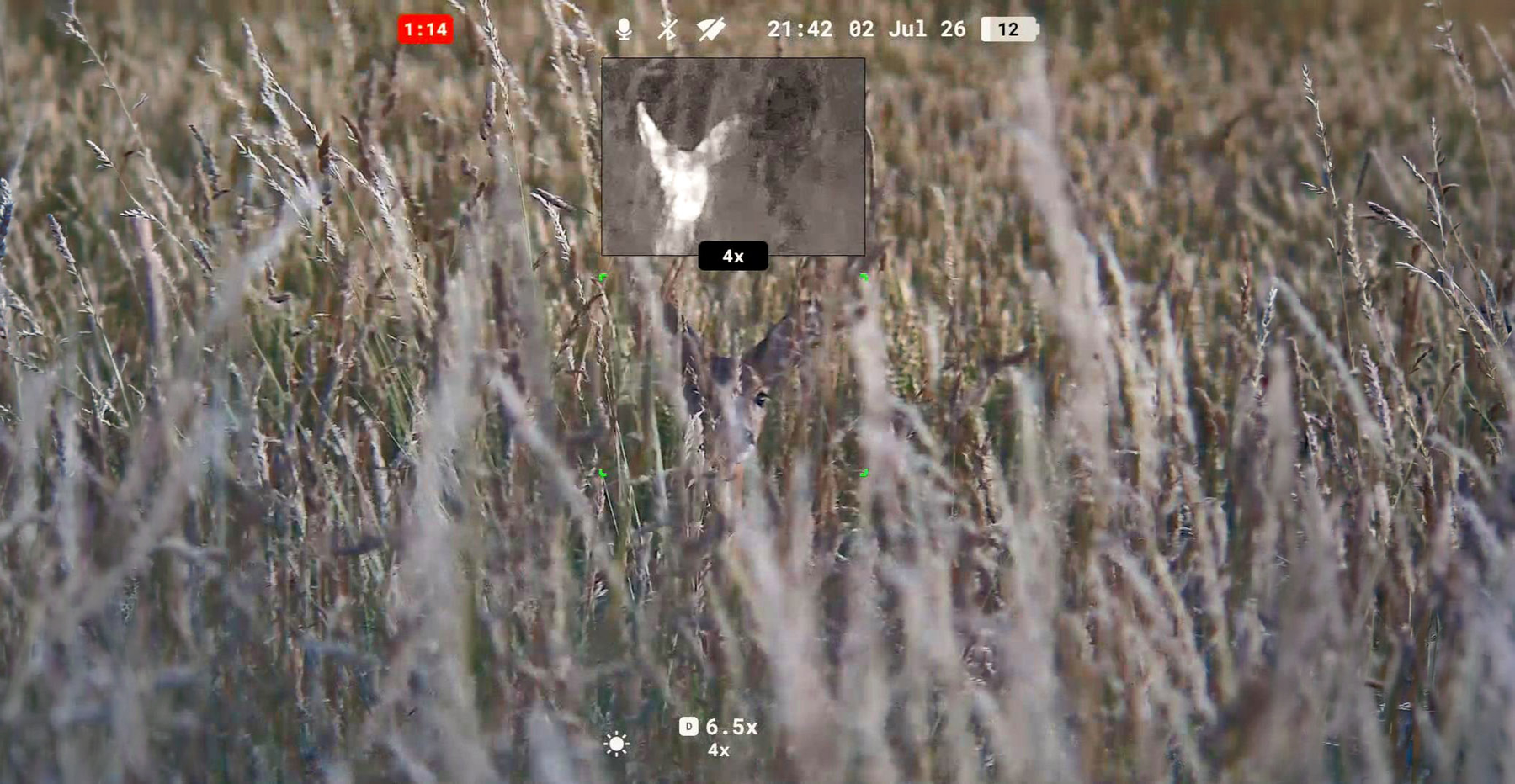
Finally, imaging: thermal is brilliant; day digital is good; night digital is short on range. By day I kept my Leica binoculars in my back pocket, pulling them out when I wanted pin-sharp detail, true colour and zero latency. At night I used thermal almost exclusively, because the thermal sensor and base magnification met nearly all my identification and detection needs, and because the on-board IR lacks reach. You can add an illuminator via the tripod socket underneath, but it makes things bulky.
In truth, I don’t care about these limitations because, as with all multispectral binoculars, the other channels simply make the thermal channel more meaningful. What matters is being able to see the quarry and the landscape in main-screen thermal and then put the most informative supplementary channel in the PiP window, or ready for a quick confirmatory switch.
The verdict on the Pulsar Symbion LRF DXR50
Unlike some multispectral binoculars, the Symbion gives you complete control over how you use each window, and it will even activate and deactivate the illuminator automatically as you open and close the NV channel.
To conclude, the Pulsar Symbion is expensive. It does thermal notably better than the Chinese units I’ve tried – the image feels more realistic and less AI-enhanced – but delivers nothing special in digital terms. And yet it gave me the best user experience I’ve ever had with multispectral binoculars by a country mile.
The excellent quality of the design and construction, the intuitive immediacy of the controls and the versatility of the carrying solutions all come together to make a compelling argument to anyone who can afford them that these binoculars are simply the best to buy.
Frequently asked questions
How much does the Pulsar Symbion LRF DXR50 cost?
£3,779.95 RRP at the time of publication, from pulsar-vision.co.uk.
How far will the Symbion’s rangefinder read?
Up to 1,500m, so ranging a roebuck at half that distance is straightforward. The rangefinder sits flush in the bridge alongside the 850nm IR illuminator.
Is the night digital channel any good?
It is the weakest of the three, being short on range, largely because the on-board IR illuminator lacks reach. You can add an illuminator through the tripod socket underneath, but it makes the unit bulky. In practice the thermal channel does nearly all the identification and detection work after dark.
How does it compare with cheaper Chinese multispectral binoculars?
Pulsar does not compete on price. Its thermal imaging is notably better, with an image that feels more realistic and less AI-enhanced, and the ergonomics are in a different class. Digital day and night performance is not markedly ahead.
What comes in the box?
Two APS5 batteries and a twin charging dock, a broad neoprene neck strap with quick-detach clips, a thickly padded case with side pouches and a silent roll-forward top, a deluxe harness that converts the case into a bino caddy, and a lightweight binocular harness that connects directly to the unit.

About the author
Jules Whicker
A long-time contributor on shooting optics and technology, Jules Whicker has written for Gun Mart since 2016, covering shotguns, rifles, airguns, thermal imaging and night vision, along with reports from major shooting shows such as The Game Fair and The Stalking Show. His reviews and features draw on his own experience in the field across game shooting, decoying and clay shooting.
Related Articles

Nocpix ACE2 thermal scopes: identification over detection
The ACE2 range lands on 12 September in three configurations, from £2,999 to £5,299. Its most significant feature is not the 1280 sensor
By Shooting Times | 16 September 2026

HIKMICRO's three-step stalking ecosystem tested on muntjac
Ed Jackson takes HIKMICRO's three-step detection, observation and shot ecosystem into the high seat after muntjac, to find out whether connected kit really earns its place on a stalk
By Ed Jackson | 11 September 2026
Get the latest news delivered direct to your door
Subscribe to Shooting Times & Country
Discover the ultimate companion for fieldsports enthusiasts with Shooting Times & Country Magazine, the UK’s leading weekly publication that has been at the forefront of shooting culture since 1882. Subscribers gain access to expert tips, comprehensive gear reviews, seasonal advice and a vibrant community of like-minded shooters.
Save on shop price when you subscribe with weekly issues featuring in-depth articles on gundog training, exclusive member offers and access to the digital back issue library. A Shooting Times & Country subscription is more than a magazine, don’t just read about the countryside; immerse yourself in its most authoritative and engaging publication.